> For the complete documentation index, see [llms.txt](https://docs.plugin.global/llms.txt). Markdown versions of documentation pages are available by appending `.md` to page URLs; this page is available as [Markdown](https://docs.plugin.global/plugin-2.0-node-operators/unstake-pli-tokens-from-plugin-1.0-node.md).
# Unstake PLI Tokens from Plugin 1.0 Node
## STEPS TO UNSTAKE PLI FROM PLUGIN 1.0 NODES
1. Unstake your Plugin 1.0 Node.
* Members who have completed one year of staking and haven’t activated restaking can find a **button to request the unstaking of the node in the Oracles platform**.
* The other option for members who have enabled restaking would need to raise a Ticket to unstake your Plugin1.0 Node.\
While raising the ticket, in “Issue Description:” please provide the below-mentioned details.\
**a) IP address: \**\
**b) Stake ID: \**\
**c) Node Address:\**\
**d) Restake ID:\**
The IP address of your node can be found in your[ https://oracles.goplugin.co](https://oracles.goplugin.co) dashboard as mentioned in the image below.

Your node's stake ID and node Address can be found in your[ https://oracles.goplugin.co](https://oracles.goplugin.co) dashboard as mentioned in the image below.
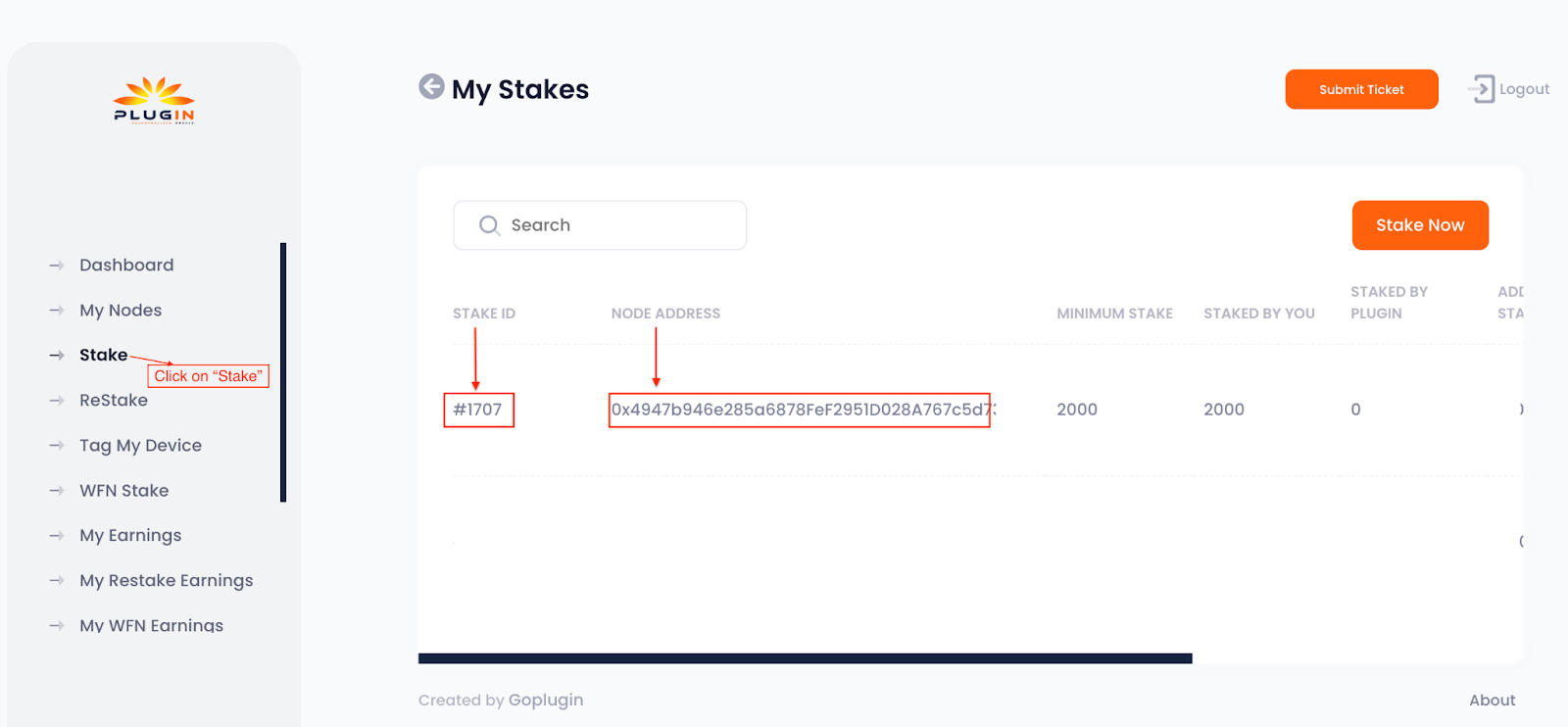
Your node's ReStake ID and node Address can be found in your[ https://oracles.goplugin.co](https://oracles.goplugin.co) dashboard as mentioned in the image below. \
**Note :-** Cumulative tokens must reach 500 to get paid and this will get auto-calculated when the node is in the staking pool. Once the node is in un-staked status, the cumulative tokens will not be incurred further.
NOTE: In Plugin2.0 we do not support the Docker Method of node installation, we do support only script-based node installation. To refresh the Docker-based Plugin1.0 node to Plugin2.0, refreshing the node with your VPS service provider is the better option.
2. Once the node is unstaked, withdraw the PLIs to your registered wallet account.
3. Now you can reset your node with the help of your VPS provider or else you can use the script ‘reset\_pli.sh’ which will be found in your “plugin\_deployment” directory (If you installed Plugin1.0 using “Modular Method”).
4. If you are selecting the 'reset\_pli.sh' option to refresh your node, then remove the following lines from your "\~/.profile".\
\
export GOROOT=...............\
export GOPATH=................\
export FEATURE\_EXTERNAL\_INITIATORS=true\
\
And for "export PATH" entry, remove "$GOROOT/bin", "$GOPATH/bin" alone from PATH variable. Now run "source \~/.profile" in the cli of your node.
---
# Agent Instructions
This documentation is published with GitBook. GitBook is the documentation platform designed so that both humans and AI agents can read, navigate, and reason over technical content effectively. Learn more at gitbook.com.
## Querying This Documentation
If you need additional information that is not directly available in this page, you can query the documentation dynamically by asking a question.
Perform an HTTP GET request on the current page URL with the `ask` query parameter, and the optional `goal` query parameter:
```
GET https://docs.plugin.global/plugin-2.0-node-operators/unstake-pli-tokens-from-plugin-1.0-node.md?ask=&goal=
```
`ask` is the immediate question: it should be specific, self-contained, and written in natural language.
`goal` is optional and describes the broader end goal you are ultimately trying to accomplish on behalf of the user. GitBook uses it to tailor the answer towards what is most useful for that goal.
The response will contain a direct answer to the question and relevant excerpts and sources from the documentation.
Use this mechanism when the answer is not explicitly present in the current page, you need clarification or additional context, or you want to retrieve related documentation sections.